
The First-Time Founder's Guide to App Development
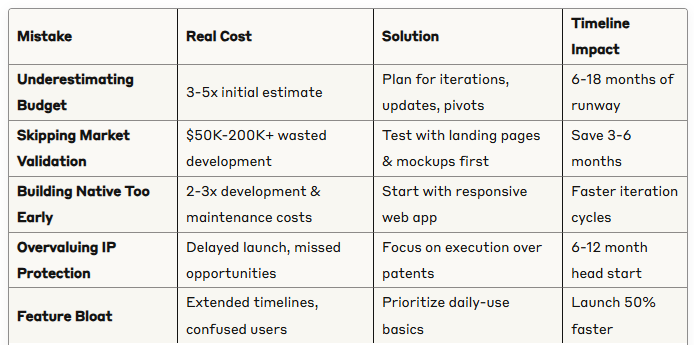
Key Insights Summary
Building your first app feels like standing at the edge of a cliff—exciting and terrifying. After working with hundreds of first-time founders, I've seen the same expensive mistakes destroy promising businesses before they even launch.
This guide breaks down the five critical errors that kill 90% of first-time app ventures and shows you exactly how to avoid them.
Mistake #1: The Budget Death Trap (Budget 3-5x Your Initial Estimate)
The Hidden Reality of App Development Costs
Most first-time founders approach app budgeting like buying a car—they expect a fixed price for a finished product. This thinking destroys more startups than bad ideas.
Why Traditional Budgeting Fails:
- Apps require constant iterations based on user feedback
- Platform updates force regular maintenance
- New ideas emerge during development that reshape the product
- Market conditions change, requiring pivots
Real-World Example: A fitness app founder budgeted $30,000 for development. By month 8, they'd spent $75,000 and still needed:
- iOS 17 compatibility updates
- Payment system integration fixes
- Three major feature iterations based on beta feedback
- Android version development
The 3-5x Rule in Action: Your $50,000 app budget should actually be $150,000-250,000 when you factor in:
- Initial development: 40%
- Testing and iterations: 30%
- Maintenance and updates: 20%
- Unexpected pivots: 10%
Smart Budgeting Strategy:
- Calculate your MVP estimate
- Multiply by 4 for realistic planning
- Secure funding for 18 months of runway
- Plan quarterly budget reviews
Mistake #2: Building Before Validating (Test Demand First)
Why 70% of Apps Never Find Product-Market Fit

The most expensive code you'll ever write is code for features nobody wants. Yet most founders dive straight into development without validating demand.
The Validation-First Approach:
Step 1: Create Design Mockups
Before writing a single line of code, create detailed mockups showing:
- Core user flows
- Key features in action
- Value proposition clearly displayed
Step 2: Build a Landing Page
Your validation landing page needs:
- Clear headline explaining the problem you solve
- Visual mockups of your solution
- Email capture for early adopters
- Social proof elements (even if minimal)
Step 3: Drive Targeted Traffic
- Google Ads targeting your keywords
- Social media campaigns to your ideal users
- Direct outreach to potential customers
Step 4: Measure Real Interest
- Email signup conversion rate (aim for 3-5%)
- User feedback on specific features
- Willingness to pay (pre-orders or wait lists)
Case Study: A productivity app founder spent $2,000 on mockups and a landing page instead of $80,000 on development. The landing page attracted 50 signups from 2,000 visitors—a clear signal to proceed. More importantly, user feedback revealed that 60% wanted feature A, while only 15% cared about feature B, which would have been their main focus.
Validation Saves You:
- $50,000-200,000 in wasted development
- 6-12 months of building the wrong thing
- The emotional toll of launching to crickets
Mistake #3: Going Native Too Early (Start with Web Apps)

The Native App Trap That Doubles Your Costs
Native mobile apps feel like the "real" way to build an app. This bias costs first-time founders dearly.
Why Web Apps Win for MVPs:
Development Speed:
- Single codebase vs. separate iOS/Android versions
- Faster iteration cycles (deploy instantly vs. app store approval)
- Easier to find developers
Cost Comparison:
- Native app development: $100,000-300,000
- Responsive web app: $30,000-80,000
- Maintenance costs: 50% less for web apps
User Intelligence Gathering: Web apps provide better analytics:
- Detailed user behavior tracking
- A/B testing capabilities
- Real-time feature usage data
- Easier integration with analytics tools
The Progressive Enhancement Strategy:
- Phase 1: Responsive web app (Months 1-6)
- Phase 2: PWA (Progressive Web App) features (Months 6-9)
- Phase 3: Native apps based on proven user patterns (Months 9+)
When to Consider Native Earlier:
- Camera/GPS functionality is core to your app
- You need device-specific features (Push notifications, etc.)
- Your target users strongly prefer app store discovery
Real Success Story: A meal planning startup launched with a web app, gained 10,000 users in 6 months, then used that data to build a focused native app that achieved 4.8 stars and 100,000 downloads in year two.
Mistake #4: The IP Protection Paralysis (Speed Beats Perfect)

Why Founders Waste Months Worrying About Copycats
First-time founders often spend months researching patents, worrying about competitors, and building in secret. This perfectionist paralysis kills more startups than competition ever will.
The Harsh Reality About IP:
- Most app ideas aren't truly unique
- Execution matters more than ideas
- Legal protection is expensive and slow
- By the time you get protection, the market has moved
The Competition Reality Check: Unless you have:
- A genuine patent-worthy invention
- Proprietary data or technology
- Exclusive industry partnerships
- Unique regulatory advantages
Your "secret sauce" is probably already being used somewhere else.
Speed-to-Market Advantages:
- First-mover advantage: Build brand recognition early
- User feedback: Learn and improve faster than followers
- Market education: You define the category
- Partnership opportunities: Establish key relationships first
The Execution-First Strategy:
- Launch quickly with core features
- Gather user feedback rapidly
- Iterate based on real data
- Build defensible moats through user experience and network effects
Success Hierarchy (Most Important First):
- Speed to market > Perfect product
- Interested user list > Big launch with no awareness
- Daily active users > Total user count
- Basic features used daily > Innovative features ignored
- Paying users > Free users
- Simple solutions > Complex systems
Mistake #5: Feature Bloat and Complexity Creep

Why Simple Apps Win and Complex Apps Die
The most successful apps do one thing exceptionally well. Yet first-time founders consistently build Swiss Army knives when users want scalpels.
The Feature Trap: As development progresses, founders add features because:
- "It would be cool if..."
- "Our competitors have this..."
- "Some users might want..."
- "It's technically possible..."
The Cost of Complexity:
- Development time: Each feature adds 2-3 weeks
- User confusion: More features = harder to understand value
- Maintenance burden: Every feature needs updates and bug fixes
- Delayed launch: Perfect becomes the enemy of good
The Daily Use Test: Before adding any feature, ask:
- Will users engage with this daily?
- Does this solve a core problem?
- Can we achieve the same outcome more simply?
- What happens if we remove this?
Feature Prioritization Framework:
- Must-have: Core functionality that defines your app
- Should-have: Features that enhance the core experience
- Could-have: Nice additions that don't compromise simplicity
- Won't-have: Everything else (for now)
Building Your Success Timeline

Month 1-2: Foundation Phase
- Create detailed mockups
- Build validation landing page
- Start driving traffic and collecting feedback
- Refine core value proposition
Month 3-4: Validation Phase
- Analyze user feedback and behavior
- Iterate on designs based on real data
- Build email list of interested users
- Confirm willingness to pay
Month 5-8: Development Phase
- Build responsive web app MVP
- Focus on core features only
- Implement basic analytics
- Prepare for beta launch
Month 9-12: Growth Phase
- Launch to beta users
- Gather usage data and feedback
- Iterate based on real user behavior
- Plan native app development (if needed)
Key Takeaways for First-Time Founders
Budget Reality: Plan for 3-5x your initial estimate and 18 months of runway. Most successful apps require multiple iterations before finding product-market fit.
Validation First: Spend $2,000 on validation before spending $50,000 on development. Mockups and landing pages reveal user preferences without the development risk.
Web Before Native: Start with responsive web apps for faster, cheaper iteration. Move to native only after proving user demand and understanding usage patterns.
Execution Over Protection: Speed to market beats perfect products. Focus on building and improving rather than protecting ideas that might not work.
Simple Wins: Build the minimum viable product that solves one problem exceptionally well. Add features only after users prove they need them through daily usage.
The app graveyard is full of beautifully designed, well-funded products that nobody wanted. Don't let yours be next. Start with validation, build simply, launch quickly, and improve relentlessly based on real user feedback.
Your first app probably won't be your last, but following these principles will dramatically increase its chances of being your first success.
Get Your Project Started Right
Before you spend a single dollar on development, get clarity on your approach. We offer free 30-minute strategy sessions to help first-time founders:
- Validate your budget against realistic timelines
- Review your validation plan before you invest
- Assess whether to start web or native
- Identify potential roadblocks early
No sales pitch. No commitment required. Just practical guidance from developers who've helped 200+ founders avoid these exact mistakes.
[Schedule your free strategy session →]
"I wish I had this conversation before I spent $80K building the wrong thing. Would have saved me 8 months and a lot of stress." - Sarah M., Founder
Questions about your specific project?
Email us your biggest concern about getting started, and we'll send you a personalized response within 24 hours:
[email protected]